Reference Readings - UAP Gateway and Server
What are Gateways?
A gateway often has varying different definitions depending on the source of information you are reading from. Modern common gateways are typically a single computer running several services for other computers on the network. Those services can include (but is not limited to) the following:
- Routing software: computer programs in charge of planning network traffic (enables many computers on the network to use network resources and the Internet)
- Firewall
software: computer program in charge of blocking or allowing network
traffic. They are like security guards of the network.
- Anti-virus: computer program designed to discover and eliminate computer viruses and other malware
- DHCP (Dynamic Host Configuration Protocol): service is designed to allocate necessary network information to computers on the network
- DNS (Domain Name Service): service design to translate between computer addresses (e.g. 192.168.1.1) to human memorable names (e.g. portal.uapcommunity.gov.vu, www.facebook.com)
- Proxy: service meant to keep in memory various Internet and website objects for faster retrieval later. Proxy are most often used for filtering in various way these days.
- Captive Portal: service designed to intercept all users on the network and require them to authenticate providing their identify to the gateway.
A gateway a computer that sits in between two networks. For example, with the Internet on one side and the private network on the other side.
What are Servers?
Servers are simply computer but they offer services as oppose to being used strictly for consuming services. There exist many kinds of servers including the following simple examples:
- Web servers: servers designed to host and offer access to web pages.
- File server: servers designed to stored files and share them between computers.
- Authentication and authorisation server: servers whose sole purpose is to identify users of a service and decide what those users are allowed to do.
Servers can be anywhere on the network as long as computers on the network can find the servers to access the services they have to offer.
Introducing your UAP Gateway and Server
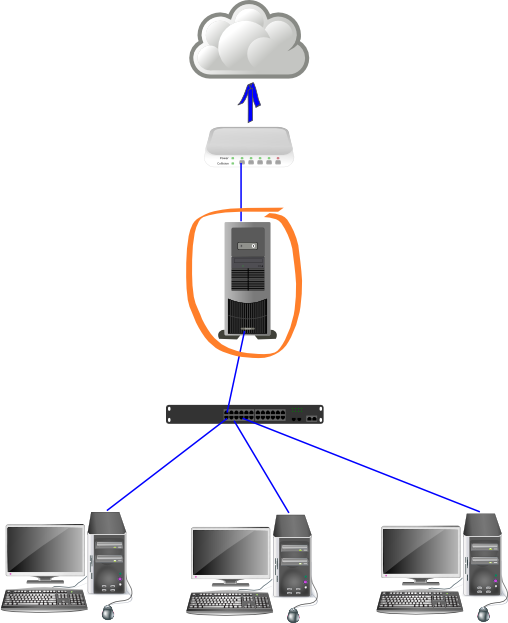
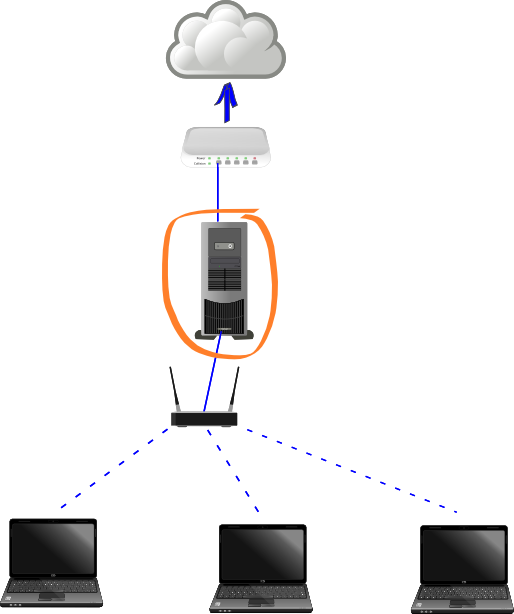
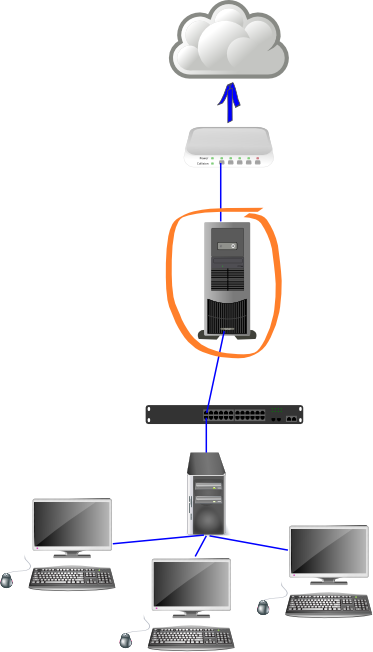
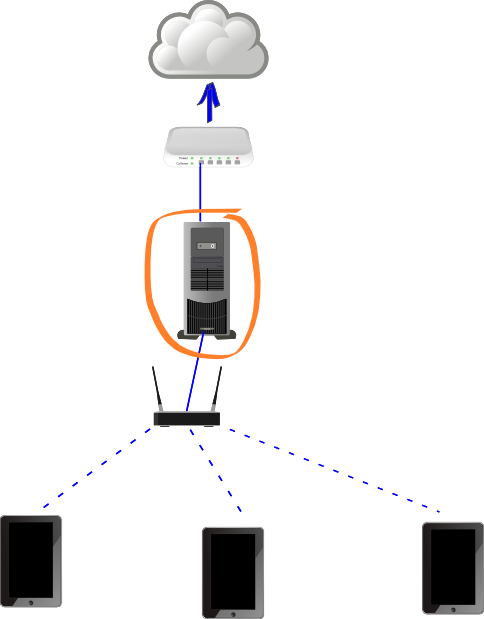
On small network it can be advantages to combined both the Gateway and the Server into a single computer saving on hardware cost, electricity cost and space in the room. The UAP Gateway and Servers will be operating in various environments in the rural schools. The following illustrates basic diagrams of various network environment in your rural areas. All networks are essentially the same with different user devices.
All network start with the Internet (the cloud on the illustrations), a modem (identified by the white box but this could be various types of devices), the gateway and server (identified by the large computer tower circled in orange), the switch or access points that link all devices on the network (below the Gateway). You may notice that all network traffic and Internet traffic will go through the Gateway.
In a Desktop Environment
Users use large desktop computers. They consume more electricity and space but can typically do much more.
In a Laptop Environment
Users use smaller laptop computers. They consume less electricity and space then desktop and offer almost al the same benefits at the expense of a little comfort.
In a Ncomputing (thin client) Environment
Similar to the desktop environment except a single machine is shared between several users.
In a Tablet Environment
Users use small tablet devices. This is a very economical way to adopt technology. It is becoming very popular and in many instances replacing the use of traditional large desktops and laptop. They do not have the same computing power and comfort of use, however.
In a Mixed Environment
It is also possible to have mixed environment such as network containing desktop, laptops and tablets all connecting together. No illustration is provided for this one but it would look like the ones above with a mixed set of devices.
UAP Gateway and Server Capabilities
In a simplified world, all services offered on the UAP Gateway and Server can be categorised into two broad types of service: the computer or network services and end user services.
Computer/Network Services
Are more technical and typically never seen by most users. They are services consumed by the computers on the network in order to ensure proper operations. A simplified summary of these services offered by the UAP Gateway and Server is provided below though they are capable of much more.
Firewall

Firewall service
is an important security service on a computer network. It decides what
traffic is allowed to come inside the network and go outside the
network. It is a primary line of defence against attackers. It is much
like a person of authority, a village chief for example, that decides
who can go where such as only adults to night events.
Anti-virus

Anti-virus service
is yet another important security service on a computer network. It
should run both on the Gateway and all computers on the network.
Anti-virus are computer programs that try to find and eliminate computer
viruses and other malware, programs trying to do arm to computer users.
They are much like doctors trying to health people with health
problems.
Filtering

Filtering service is also considered a security service on a computer network. Filtering technologies are meant to block access to sites not allowed by the network usage policy. Those usage policy are often meant to protect vulnerable users such as new technology adopters and young children. The programs are much like police officers that enforce the rules of the law to protect the citizens.
Authentication and Authorisation
Authentication and Authorisation services
are important for monitoring and also for security of the network
infrastructure. These services identify all actions on the network by
users and make it possible to do effective monitoring of activities to
both improve services to users and identify behaviours that may go
against the site policies. These services also help managing permissions
on the network including user applications. For example, teachers have
permissions to access some resources that students may not.
End User Services
Are directly consumed (used) by most users. Those services are most often referred to as Applications.
Captive Portal
The Captive Portal login page will redirect users to a special home page called a portal. A portal is simply a web page or application which provides its target users with directions. The UAP Gateway and Server has a portal web page with links to access various other end user services which will be introduced in the following sections.
Digital Library
The UAP Gateway and Server is small but it contains a very large digital library, much like the library of books you may have at your school but MUCH bigger. The digital library offers global freely available content such as online encyclopedia (knowledge book), literature books from some of the best writers in the worlds, learning interactive activities and much more. Local content from the Vanuatu school curriculum is also accessible which you might have already used in the past in on printed paper.
Locally Produced Digital Content

Some services are meant to help schools and communities build their own websites and/or local language digital knowledge books (wiki). Eventually communities will even be able to produce their own digital maps of their area. Such activities have been demonstrated to encourage users to take ownership of their technologies and strive to benefit from their use.
The Internet
The Internet is the largest computer network in the world and has a very large number of services online, some are freely accessible while others cost money. The most basic services of the Internet are electronic mail (email), searching (for information or services) and social media for online collaboration. The Internet offers useful services but keep in mind your connection might be a little slow and not reliable (some times not working) though hopefully this will improve over time.
Tools
Finally, the UAP Gateway and Server offers a growing list of tools for users, teachers and supervisors. Examples of tools include a private cloud which is simply a centralised place where users can stored some of their documents, a traffic monitoring applications to view and analyse network traffic, a backup user interface and access to other more advanced tools.
More details about all of the services introduced here are provided in other training modules.